Used laptops are such a good deal that you could something high quality in excellent condition for so little that I almost can't justify buying something like this. Like used Dell XPS laptops are ridiculously cheap and they're amazing for the used price.
Or really buy any laptop rated highly by Dave2D or other reviewers that's 4 to 5 years old.
Absolutely. Any 2-3 gen old ThinkPad or Elitebook will outlast this and perform lot better.
I bought a tablet from this brand few years back. Screen edges were non responsive to touch within months.
I bought one of these last year, specifically looking for a modern take on the netbook form factor. I run PopOS on mine and absolutely love the machine. It’s a perfect travel laptop and it has largely replaced the iPad mini that I previously used as my travel companion. I sometimes use it with XReal glasses, which is great. I’ve found that a 35 watt phone charger is sufficient to charge it over USB C, so I don’t even need to carry a laptop-class charging brick.
I will note that I also had the screen rotation issue described in the post, but it was easy to solve at the desktop environment level in COSMIC. I didn’t bother dealing with it elsewhere because I honestly don’t mind if the grub menu is sideways.
The Minibook X is obviously targeted at the netbook form factor in the traditional sense, i.e. small and cheap. If you're like me and appreciate the netbook/UMPC form factors (for travel purposes in my case) but also need better specs to actually get any work done -- and you're willing to fork out a bit more to get that -- I would recommend looking at GPD's Pocket and MicroPC series. I own both a Pocket 4 and MicroPC 2 with Linux on them, and I'm quite satisfied. The only issue I've noticed is the same screen rotation quirk described here, for which the same workarounds apply.
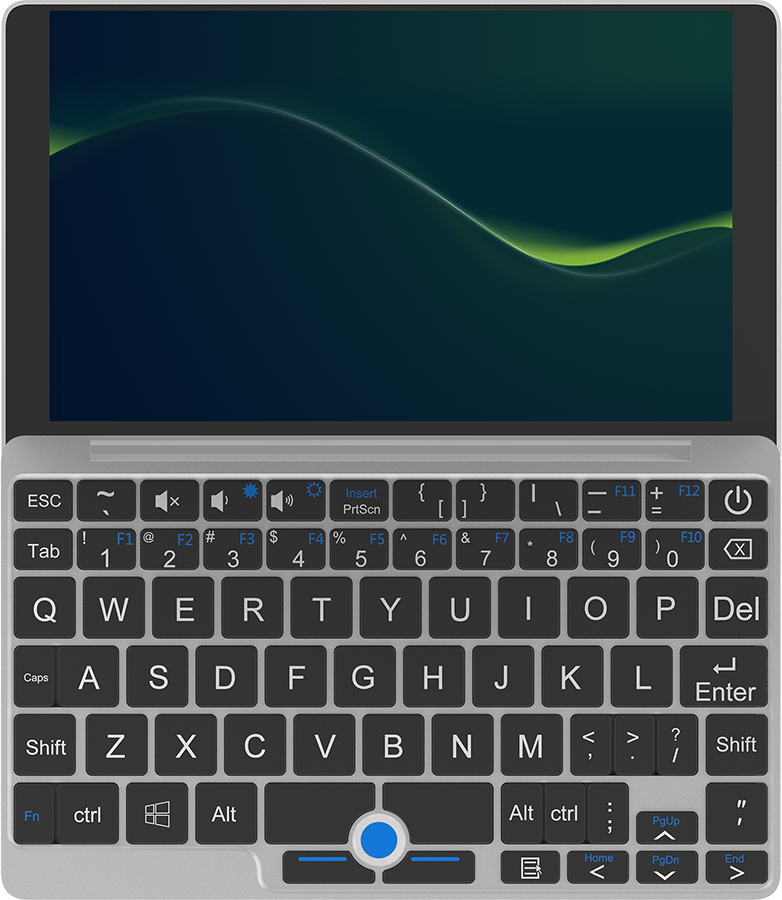
This is the primary reason the Minibook X won out in my searches: It's the only small device that has a keyboard layout that puts all of the keys in the right spots.
They're sometimes an odd size, but when I hit the wrong key due to a sizing constraint, I don't even have to think: Backspace, hit the right key with mildly adjusted positioning.
I've tried a few machines with different layouts, and that's never the case - and having to stop and look at the keyboard to find a key interrupts flow in the worst kind of way.
The specs on this thing look pretty great. Which part do you find insufficient?
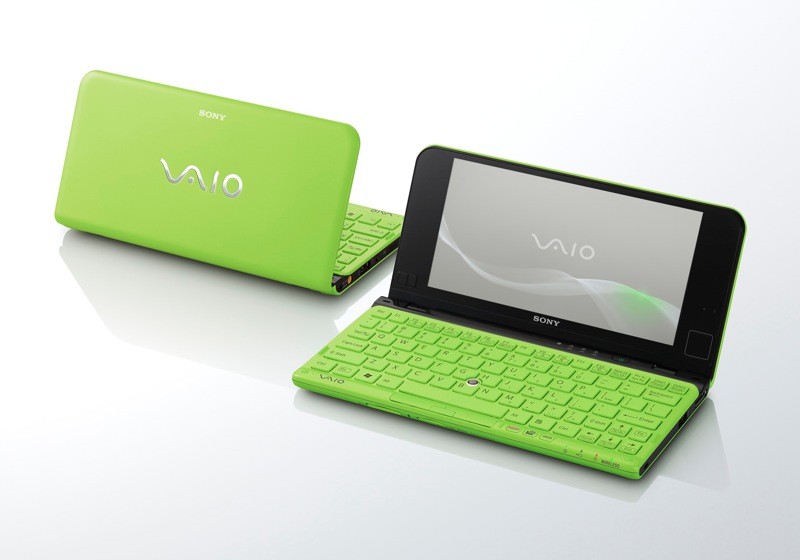
I miss my Sony Vaio P series which fitted in a similar sort of niche, the cellphone radio made it just by far the best laptop I've ever used. Modern laptops don't seem to have provision for a LTE/5G radio which always confuses me a bit, in this form factor it would be ideal. I'm surprised nobody has cloned this actually, with phone screens being the right aspect ratio it seems obvious.
https://www.zdnet.com/a/img/2014/10/03/9f923860-4b47-11e4-b6...
Modern laptops either have an LTE modem integrated into the general wireless chip, or have a short m.2 slot for a modem card.
My T14 has even a dedicated slot for a SIM card.
I had a thinkpad at one point that had a slot, but because it wasn't optioned for it you had to patch the BIOS or it wouldn't boot with anything in the slot, it seemed so hostile as to be worthless.
we're probably only a year or two out from LTE/5g being an option on Apple laptops, and I can see a bunch of other manufacturers jumping in a year after that to claim parity.
(Note: My estimate on this is purely based on Apple implementing/expanding the use of their own cell modems, which also includes their wifi chip. It seems logical that they would quickly adopt the same chip for wifi in their laptops, thusly getting LTE/5g 'for free'. Definitely no insider knowledge on this)
There's actually a known prototype MacBook Pro from 2006 with a cellphone radio, and the release MacBook Pros from the time all have a weird looking area near the battery and RAM where the SIM slot was supposed to be, and some leftover parts for the goofy little extendable antenna on the screen. Hopefully they end up doing it.
https://www.macrumors.com/2011/08/14/photos-of-a-prototype-m...
Probably a lot of people who care about this niche just get an iPad. (Which is what I've done - 5G iPad is great for travel - if I need something with a real OS, it waits until I'm home.)
I got Vaio P many years after the fact and it was so neat. Alas, the PowerVR gpu Intel included on many of the chips there is quite quite problematic for anything but basic use. Although it just saw more work recently! https://www.phoronix.com/news/Intel-GMA500-Driver-In-2026
I think it was a year or two latter I got a Chuwi Lapbook 12.3, which was a great machine. Lovely 3:2 screen off the Surface Pro, again a pretty good Intel small-core set-up, decent ram, ok SSD, all so cheap. Great metal case. Lovely machine, at such a great price. https://www.notebookcheck.net/Chuwi-LapBook-12-3-Celeron-2K-...
I somehow managed to get it working in 2016 with a lot of hackery, I'd still have it as a usable device if the weird little pouch cells it had didn't die, repacking those batteries seemed like enough of a fire hazard I just didn't bother.
What's the problem with 2K 50Hz screen? Too high resolution?
Lots of 15.6" Windows laptops come with 1080p screen which is painful to look at.
50Hz is a weird refresh rate. Even back to the 80s (and before?) PCs have been 60Hz at a bare minimum.
Standard CRT TV refresh rate in the UK. Pretty much all home computers here produced 50 Hz output, the goal being that they could be connected to a TV, until the PC started to eat that sector in the early 1990s. Games consoles supported 50 Hz (same rationale) until at least PS2/Xbox.
50Hz is what European power runs at, as opposed to North American 60Hz. This had some correlation to the analog film frame rates being 25 fps in Europe and nearly 30 fps in America, though I’m not entirely sure what the cause was.
Nowadays it’s probably a performance / battery saving “feature” attempt.
TV signals (PAL and NTSC) were 50 and 60 Hz so as to be in sync with the flickering of electric lamps.
When film is converted to 50 Hz TV, the film is sped up 24->25 fps and every frame shown twice.
When converted to 60 Hz TV, there is "2:3 pulldown": every even frame is shown twice, every odd thrice.
(Actually, both PAL and NTSC have interlaced video modes, with only every other line updated each frame, so as to conserve bandwidth.)
BTW, when 60 Hz computer monitors were introduced in Europe and used in office spaces with fluorescent lights with passive ballasts that flickered at 50 Hz, some sensitive users suffered headaches from using the computer screen for too long.
These days, both fluorescent lights and LCD backlights tend to flicker at much higher frequencies that it isn't much of a problem.
Nah, not film rates [1], video: NTSC is 30fps and PAL is 25fps because the cathode ray tube scan rate was built around AC power cycles. When low fps truly Hz. Sorry.
[1] generally 24fps because that is culturally what film looks like and people get very weird whenever anyone tries to fuck with it
I'll allow your joke, but NTSC is 60 fields per second, and PAL is 50. Certainly a large portion of content came from film and in PALworld would be shown as even and odd halves of a frame, or in NTSCland as 3 halves of a frame, then two halves...
But actually interlaced content exists too. Each field is independent, there's no frames to speak of.
Early video game systems based on NTSC/PAL ran at 60 fps or 50 fps, but ran off-spec signals to always hit the same half of the display lines (odd or even). 4th gen systems (genesis/mega drive and snes/sfc) had a few games that used interlaced output; later systems had many, running PAL@60Hz became a common option too.
Certainly seems too high for that screen size. But probably not fatal
I use a GPD Win Max 2 for this purpose (https://fluctlight.net/gpd_win_max_2) and while it has its quirks, the performance of a Ryzen APU is significantly better than the Chuwi Minibook X.
I think my desire for this kind of product is something lighter, but this set of notes on the Chuwi feels like the compromises GPD gives you but with less power.
The GPD devices seem like they've cornered this whole niche in terms of ideal form factor but they are all ridiculously overpriced and that was before RAMpocalypse. I'm actually unsure how they will weather this storm because they are a small company and likely don't have any economies of scale to rely on.
I had no idea other vendors like Chuwi were providing netbook like devices. I will be doing more research tonight. Great post by OP!
That $350 price tag is good for that configuration. Not sure how fast the USB-c ports are. It should have an HDMI 2.0/2.1 port. Mini PC's with the N150 CPU support 2 4k@60Hz monitors.
It looks nice but I feel like a bear riding a tiny unicycle using these kinds of computers.
Netbooks aren't dead, they're just called Chromebooks now
Chromebooks aren't netbooks.
They're Android tablets with non-removable keyboards.
The idea of a netbook was very small, cheap, portable, full-featured computer that you could use like a normal computer.
All the ports, your desktop OS, and so on.
Chromebooks ain't it, even if they compete in the market segment that made netbooks a success.
So replace the OS: https://docs.mrchromebox.tech/
I've done that with mine. Worked great, and now I get around 30 hours of battery life with a lean linux distro, as long as I'm only like reading websites or writing on it.
I run my desktop OS on my Chromebook (boring Debian) and use it like a normal computer. All the ports (HDMI, usb) and so.
Back when Chromebooks and Netbooks were contemporaries, yours was a much harder proposition. I had an awful time getting Linux on my first gen Chromebook
That sounds like an opinion baked in 2013 and never revisited. A modern chromebook with Crostini can run basically any Linux desktop stack you want. Like, what exactly are the tasks you need from a "computer that you could use like a normal computer" that you aren't getting today?
As a data point: I'm 100% converted personally. A Chromebook is what goes into my backpack and the device I use for all my general day-to-day UI clickery, and it's a better fit for my needs than Windows (not nearly as bad as it used to be but still sort of a PITA to make work as a Linux-focused dev environment) or Linux (not nearly as much of a PITA for a connected consumer network device but still has the occasional wart trying to get something weird to run).
I love small laptops but this thing would really benefit from a better processor. It's about 4x slower than the Snapdragon 8 elite, a 2 year old smartphone chip.
16GB ram is cool though.
I think the "net" does a lot of heavy lifting for a box like this - e.g. you do all the important work on a remote server, and only do basic maintenance work on the laptop itself.
It'd be so lovely if these phones & systems could run Linux. Man. Such a pity.
PostmarketOS has a small handful of Snapdragon 870, 865 tablets (~5 year old, Cortex-A77). But it feels like it's by hook & by crook. Meanwhile it feels like bootloaders are just getting more and more locked down, making it less interesting whether mainline Linux support developers or not.
Dump the desktop. Switch your login shell to emacs and you have an overpowered WritersBook that’ll fit in a coat pocket.
> Keyboard is terrible – it only registers keystrokes when you hit the exact center of each key.
So, unusable for blind typing.
920g for a 10" is also crazy much. LG make 14" laptops under a kg.
I want something like the Sony Z4 tablet. About 600g with keyboard dock. Thin, waterproof (not the keyboard), days of standby, 4G supported, the keyboard was excellent.
If it would be possible to run a current version of Android on it, it would be perfect.
> Keyboard is terrible – it only registers keystrokes when you hit the exact center of each key.
I'm a big believer in cheap, small, low-power laptops. For simple tasks, you don't need that much compute.†
But you can't skimp on the keyboard! Especially because, one of the big advantages of a low-power laptop should be for writing!
------
† Okay, Electron exists... you shouldn't need all that compute.
Alan Cox had a pre-netbook netbook smaller than a VHS tape at linux.conf.au 2001, and milled about chatting with colleagues and fanboys while his kernel builds scrolled by in the background. Everyone would gawk at the strange little machine.
It was Japanese, naturally.
At linux.conf.au 2007 we chose a smaller conference bag, designed to carry your electrical accessories and nick-knacks... it turned out to be the perfect size for the new EeePC (and later the MacBook Air 11").
I love netbooks and I am curious to get one of these at some point - I can’t justify one right now.
I do have my ASUS EEEPC 701 4G Surf still working. I think it is 18 years old at this point? It is rocking Antix, in its 3.6 GB hard drive. It broke the S key in the keyboard last night and I ordered a replacement.
I use it as writer deck and to ssh to my server and raspberry pi from the sofa.
It is built in a very resistant way? Survived my kid so far.
The Crash Override boot up screen tho. HACK THE PLANET!
where can i pick one up thats reputable?
I have this laptop, and it is amongst the best laptops I have ever owned, despite being awful in many ways. It has almost completely replaced my use of my M4 Macbook Pro, simply because I always have it with me. That, and it can run Linux.
I don't share the complaints of the OP about the keyboard or the screen, though. The keyboard is fine, I can hit about 110WPM on it, slower than my regular pace, but enough that there's no dramas. The layout is great: Occasionally there's keys that are too small (looking at you, apostrophe) but everything is at least in the right spot, which is way more important.
The 2K display at 10" is high enough DPI that everything is totally crisp, and you can unlock ~95Hz (bad for video, good for everything else) with a bit of a tweak. You can also smash a byte into the EC at the correct offset and access the full unrestricted BIOS -- mostly to crank the RAM up to 4800MT/s.
I'm running vanilla Arch with Niri and Noctalia, and it's a dream. It's my primary dev machine, used in combination with a remote server with a tonne more grunt. If it broke tomorrow, I'd buy another - and I wouldn't do that with my macbook.
To the OP:
* Accelerometer support, EC-byte-bashing to get BIOS unlock: https://github.com/greymouser/minibook-x-tools
* 95Hz EDID fix: https://github.com/sonnyp/linux-minibook-x/issues/7#issuecom...
Did you also have the screen rotation issue? Curious to know what's causing that.
The cause is just that the panel is mounted rotated on the device. It's supposed to be used in a tablet where the top is the short end and the side is the long end, opposite to a laptop.
Yes, I did, and the reason is super straightforward: It's a hardware portrait panel, mounted sideways.
Getting from zero to a fully working OS was a mild journey, but I'd do it again.
Are the specifications listed in the article reliable?
It's difficult to trust them, considering Chuwi has a history of misrepresenting CPU specifications.
The author's benchmarks are listed in the article.