sirwhinesalot
a month ago
It's hard to justify Liquid Glass in general. The wastefulness of flat design (in terms of space) married with the visual excess of skeuomorphism, but without even providing any affordances (does the sidebar being raised give you any new information on how to use a sidebar? No).
If you're a designer at a top 10 S&P 500 company making 6 figures, you owe it to yourself to have some love for your craft. If a PM tells you to shove a UI style meant for an unsuccessful VR device onto desktop and mobile platforms, say no. Get your colleagues to say no. Make that PM read everything the Nielsen Norman group has ever written. Read it too.
xnx
a month ago
> If a PM tells you to shove a UI style
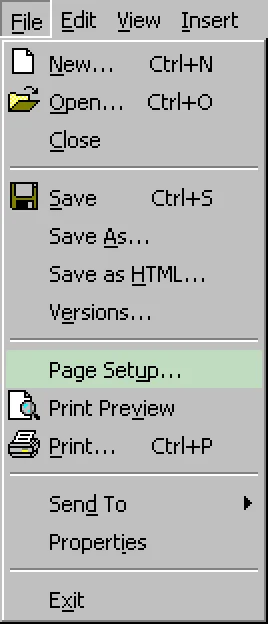
More than likely designers are making up work to justify their jobs. Not good for your career if you admit the desktop interface was perfected in ~1995.
solfox
a month ago
100% this. I recall watching their launch video about Liquid Glass. It was filled with ego-driven "we're changing the world here" nonsense. They were designing in a bubble and wanted to do something different so they could justify the work. It was never about the user.
btown
a month ago
My hot take on this is that there is a business goal to Liquid Glass that extends beyond ego - but it's about the restoration of Apple UI as an exclusive status symbol, not as a usable experience.
Apple looked at innovations in hardware form factor and, rather than trying to out-innovate in that sphere, said, instead: how do we make something in software that nobody would ever try to imitate, and thus position ourselves as the innovators once again?
And the monkey's paw curled and said: Liquid Glass is a set of translucency interactions that are technically near-impossible to imitate, sure, but the real reason nobody will try to imitate is because they are user-hostile to a brand-breaking extent.
And Apple had nobody willing to see this trainwreck happening and press the brakes.
PufPufPuf
a month ago
The business goal is clear: visionOS. Liquid Glass is designed with AR in mind, that's the only place where it actually makes some sense. Pretty much the same thing as Microsoft did with Windows 8, trying to unify the UX and visual style across PCs and phones. And it's going similarly well.
dbtc
a month ago
That's interesting and plausible.
It also contributes to obsolescing older hardware.
ibero
a month ago
we saw this exact playbook with ios 7. i don't think you need to attribute malice or read into it much.
ios 7 relied heavily on blurring effects-- a flex at the time due to the efficient graphic pipeline vs android they had. this was coming off the heels of Samsung xerox'ing and they wanted a design that would be too expensive for competitors to emulate without expensive battery hit. liquid glass is following in this tradition.
and similarly to ios 7, the move to flat design was predicated on the introduction of new form factors and screen. flat design lent itself well to new incoming screen sizes and ratios. prior there was really one or two sizes and that was it, easy to target pixel perfect designs against. as apple moves to foldables and more, this design flexibility is once again required.
as for no one trying to emulate it, i'm not so sure, OriginOS 6 ripped it off back in October.
user
a month ago
gedy
a month ago
I honestly think they could have done that and still had some taste and considered usability much more than they did.
dwd
a month ago
A design system I am required to use made a recent "major" update announcement: "Styles have been converted to variables. Styles are out and Figma variables are in".
Where what we really needed was a stable release version (now a year late from the original promised date) so we can build out UI components for the content editors to use that don't require constant design tweaks.
You know the designers are:
a) Just fucking around having fun
b) Making busy work to drag it out as long as possible
As it's now 4 years since they began working on the "design system", there's a good chance it will get canned as there's some more modern design they will want to use.
jpfromlondon
a month ago
There is a product I have to use that updated its ui design some years ago, only the functionality is partially implemented and the new design has some functional elements that weren't present in the old configuration.
This has been solved with a button that switches the layout between the two designs, when I'm making changes it is sometimes necessary to flip back and forth between the two mid-change.
hit8run
a month ago
Material Design?
Perepiska
a month ago
I used to work for one big company. Every newly hired design director desperately wanted to create a new design for the corporate portal because it would add a new line to his resume.
Rumudiez
a month ago
marketers are not designers and vice versa. of course the press release is going to be melodramatic no matter what the designers thought, or were told
gyomu
a month ago
“Marketers are not designers” is fine, except it was the designers themselves pushing the marketing drivel in those videos.
acdha
a month ago
Who was driving that, though? If the project has high-level management buy-in, the people in the scripted videos are going to be on message if they want to stay employed.
cyberge99
a month ago
You’re not looking far enough ahead. Liquid glass isn’t about Mac. It’s about VisionPro and wearables. This is a strategic play by Apple.
wolvoleo
a month ago
Microsoft totally screwed up the windows interface with windows 8 to suit tablets which they viewed as the future of computing. Not only were they wrong, they also really broke the UX for the users they did have for a new product that hardly sold and still doesn't (windows tablets). Eventually they had to cave in but Apple is more stubborn than Microsoft.
Even if Apple is right, why shoehorn the future into the present on devices unsuitable for its new paradigms? The iOSification also only worsened the macOS UX. It's one of the reasons I moved to Linux with KDE which I can configure as I like.
If they want make the AR OS of the future then make it on the vision pro where it belongs.
matthewkayin
a month ago
Microsoft may have "caved", but we're still stuck with two different settings menus and a start menu that prioritizes ads and search results over your own programs.
lossyalgo
a month ago
2 settings menus? We have every version of Windows from 3.1 all the way to 11 styled settings menus, sometimes multiple styles depending on which settings you want to look at. It's a total shitshow.
prmoustache
a month ago
Yeah, windows make linux desktop using 3 versions of GTK, QT +motif an gnustep look homogenous in comparison.
hn_acc1
a month ago
Windows is borderline unusable to me without Open Shell / Win 7 settings. I refuse to learn yet another icon idiom, just to have it change 2 years later. Thinking of trying Bazzite for my new upcoming 2nd gaming machine (for daughter) build because I'm tired of Windows. If it goes well, may convert multiple Win 10 HTPC/gaming machines.
arzig
a month ago
It’s not that bad if you configure it. Much like much of Linux…
inquirerGeneral
a month ago
[dead]
dehrmann
a month ago
Apple just reduced Vision Pro production, but Liquid Glass was in motion well before that. What leaves me scratching my head is I never got the impression Apple believed in Vision Pro. It launched because after years of research, management wanted to see if the effort was worth continuing to invest in, but that wasn't a vote of confidence.
a022311
a month ago
I'll have to second this. It's not even on Apple's homepage! I hadn't heard it mentioned for months before today. It had its niche share of users who actually found it useful, but apart from them it seems that the world is not ready for spatial computing (or maybe current spatial computing isn't ready for people, who knows?).
justinclift
a month ago
The hardware seems good, but with it being tied to the Apple ecosystem there's just no way.
I'd buy one if I could use it with my Linux (KDE) workstation, but there's no chance I'm going to be using it via a mac.
BizarroLand
a month ago
I'm hoping the new Valve headset will be like, 60% of what the Apple vision is. My boss got the Apple vision on launch day and it is really premier hardware, visuals that are almost exactly like seeing the thing you're looking at in real life, and the hand sensing / interactivity was the best I have experienced, even though it still had flaws.
But being tied to Apple's ecosystem, not being really useful for PC connection, and the fact that at least at the time developers were not making any groundbreaking apps for it all makes it a failure in my book.
If Valve can get 60% of that and be wirelessly PC tied for VR gaming then even if they charge $1800 for their headset it will likely be worth it.
gyomu
a month ago
I have a vision pro (obtained on day 1 for development purposes), and have given demos of it to a number of non enthusiast/non techie people.
All of them immediately hate that it’s bulky, it’s heavy, it messes with your hair, messes with your makeup, doesn’t play well with your glasses, it feels hot and sweaty. Everyone wants to take it off after 5-10 minutes at most, and never asks to try it again (even tho the more impressive 3D content does get a “that’s kinda cool” acknowledgment).
The headset form factor is just a complete dud, and it’s 100% clear that Apple knew that but pushed it anyway to show that they were doing “something”.
wlesieutre
a month ago
If it weren’t $3500+ I’d love one. The world isn’t ready for that price point.
josephg
a month ago
Exactly. More expensive than a high end desktop or laptop while having less useful software than an iPad. No thanks.
If it were around the $500 point I’d pick one up in a heartbeat. Maybe even $1000. But $3500 is nuts for how little they’re offering. It seems like a toy for the ultra rich.
I assumed the price would eventually come down. But it seems like they’ll just cancel the project entirely. Pity.
pixelready
a month ago
I’m assuming Vision Pro is viewed as what the Newton was to the iPhone. It will provide some useful insight way ahead of its time but the mainstream push will only happen after a number of manufacturing breakthroughs happen allowing for a comfortable daily driver UX. Optics and battery tech will need multiple generational leaps to get to a lightweight goggle / sunglasses form factor with Apple-tier visuals, tracking, and battery life…
psunavy03
a month ago
Magic Leap 2 and HoloLens 2 proved that we still haven't cracked the code on AR/XR. Similar price point, plenty of feasible enterprise use cases for folks willing to pony up money to hire Unity or Unreal devs. And I'm sure there are enough of them tired of being flogged to death by the gaming industry. But they both went splat.
It's going to take a revolution on miniaturization AND component pricing for XR to be feasible even for enterprise use cases, it seems.
BurningFrog
a month ago
Apple can afford to improve and cheapify this thing for a decade.
ChrisMarshallNY
a month ago
That’s sort of what they did with the Watch.
It has incrementally improved, and gotten cheaper, to the point that I now see them everywhere. When they first came out, they were pretty expensive. Remember the $17,000 gold Watch (which is now obsolete)? The ceramic ones were over a couple of grand.
But the dream of selling Watch apps seems to have died. I think most folks just use the built-in apps.
yakkers
a month ago
The $17,000 Apple Watch was a (rather silly) attempt to compete in the high end watch space. However, they also launched the base "Sport" model at US$349.
wlesieutre
a month ago
Not really anything like the watch, the existence of a stupidly expensive "luxury" version doesn't change the fact that the normal one started at $350.
I think the current rumor is that development of a cheaper XR headset has been shelved in favor of working on something to compete with Meta's AI glasses.
hadlock
a month ago
Did they commit to additional production of the Vision Pro? I read their announcement as quiet cancellation of VR products. They announced some kind of vaporware pivot, but I didn't read a single analyst projection that Apple ever intended to bring another wearable to market. Customer usage statistics of the Vision Pro are so low Apple hasn't even hinted about reporting on them.
Wearable products, outside of headphones, have a decade-long dismal sales record and even more abysmal user retention story. No board is going to approve significant investment in the space unless there's a viable story. 4x resolution and battery life alone is not enough to resuscitate VR/AR for mass adoption.
bandrami
a month ago
> outside of headphones, have a decade-long dismal sales record
Outside of headphones and watches
prmoustache
a month ago
Do they sell many Apple Watches? Maybe it is an euro thing but I only very rarely see people wearing one.
I would see 9 garmins for 1 Apple Watch for instance and many more people wearing cheap casios or no watch at all.
dpark
a month ago
I dunno. I see them all the time here (Seattle). Wikipedia estimates 267 million sold as of 2023.
vel0city
a month ago
I see mostly Apple watches, a few Samsungs, a small smattering of Pixel watches, and then rarely other brands like Garmin and what not around me.
prmoustache
a month ago
That's probably regional then. In my area most people using watches nowadays are usually into sports.
I must admit I don't understand the point of a smart watch when most people have their smartphone in their hand a significant amount of time a day and said smartphones screen sizes have been increasing over the year because people want to be able to doom scroll at pictures and videos and interact with whatsapp all day. I don't know how you can do that from a tiny screen on a watch.
Those like me who don't subscribe to that way of living don't want distractions and notification so they use regular watches and would see as a regression a device that needs to be charged every few days.
Some people said payments but I see peolle paying with their smartphone all the time since they have it at hands or in a pocket very close anytime having it in a watch doesn't look like a sigmificant improvement. I'd be curious to see a chart of smartwatch adoption by country.
vel0city
a month ago
Apple watches have the highest marketshare in a lot of the world's markets. According to this analysis[1], watchOS (Apple watches) make up around half of all smartwatches used in Europe. Global sales puts Apple around 20-30% market share, with brands like Samsung and Garmin around 8% [2]. I haven't found good US-only statistics to show what the market share is of watchOS is, but I'd imagine its probably close to 50% or more.
I do agree though, anecdotal experiences will vary depending on the kind of people you hang out with. For the people I know heavily into running and cycling, brands like Garmin are over represented. Meanwhile lots of other consumers practically don't even know these are options.
[1] https://www.mordorintelligence.com/industry-reports/europe-s...
bandrami
a month ago
I'm in India and the Xiaomi watches are everywhere (they probably don't sell those in the States/EU?) But also Apple and Samsung.
isbvhodnvemrwvn
a month ago
Claiming watches, phones and absolutely everything else they make are everywhere in Poland.
2muchcoffeeman
a month ago
They need to workout how to drop the price. I want one. But really can’t justify that price.
MaysonL
a month ago
Recent moves have convinced me that Apple is getting ready to push Vision Pro substantially harder.
In recent weeks, I’ve been getting push notifications about VP.
They hired Alex Lindsay for a position in Developer Relations.
And there’s the M5 update.
Just remember, it’s a lot cheaper than the original Mac(inflation adjusted). Give it 40 years – hell, given the speed of change in tech these days, it won’t even take 10.
3oil3
a month ago
I think they bought the metaverse hype and hurried up. If only they had put half the energy on AI, we'd have a createML with something else than yolov2 in 2026
psunavy03
a month ago
. . . so other devices are required to have the same interface? No, they're not. Just because you want to share enough design cues to make people understand they're dealing with the same brand doesn't mean you have to hammer square pegs into round holes.
Not to mention the fact that first, you have to get to a point where AR wearables are commercially viable, and we don't seem to have hit that point yet.
herval
a month ago
It doesnt really introduce anything that makes Vision Pro in any way better, though
treymalikcruz
a month ago
I think this is the right read in terms of intent but I also feel it offers a lens into the silliness of Apple's current strategy around all this. VisionPro appears to be currently floundering, and no matter how much they try to make it unintrusive and airy and transparent in its interface, it's presently an unwieldy device not designed to leave the home or office. Predicating company-wide design systems on this line being the future feels aspirational at best and delusional at worst. And what good is liquid glass on a Mac? To show me an obscured glimpse of my desktop background and add visual clutter?
(Apologies to @cyberge99 if my tone comes off intense, this is not to come at you but rather is just me venting my frustrations with Apple. I think you are correct in your assessment of the idea here.)
eastbound
a month ago
What’s frustrating about the VisionPro is their absolute refusal to address it as a giant screen.
All people I know describe this usecase first: “Will be awesome when it replaces my 2x34" screens”. I described it to the salesman when he asked me why I wanted to try it. He never showed it. Gave him 0/5, he complained, I explained this is specifically what I asked. You can emulate one screen in VisionPro but it’s absolutely obnoxious about making it about apps and iPhotos 3D whatever. Users desire it. Apple is hell-bent in not addressing that usecase, and addressing family usecases first.
Imagine they find a proper UI to visualize an infinite Typescript file. Something like flinch and you find yourself in a method, look elsewhere and you immediately see the other method. Make it viral by making it possible to write files in a way that is not practical to normal-screen users, like the old “max 1 screen height” limit. View your team in the corners of your vision. THE tool for remote working.
Workplaces would look futuristic. Your experience at the workplace would be renewed thanks to Apple.
And then, reuse the desktop’s UI on VisionPro instead of the desktop using VP’s concepts.
But no, Apple prefers killing off VisionPro and imposing LiquidGlass to everyone. (In waiting for my threat letter from Steve Jobs for suggesting ideas now).
justinclift
a month ago
> In waiting for my threat letter from Steve Jobs ...
Ummm, you know he died yeah?
realusername
a month ago
Sounds like Windows 8 designing their touch-first interface for a desktop, with about the same success.
schmuckonwheels
a month ago
>This is a strategic play by Apple
No, this is the fault of a company and industry with way too much money and not knowing what to do with it.
So they hired a bunch of artists who would otherwise be carving wood in a decrepit loft somewhere after taking half a mushroom cap. These people now decide how computers should operate.
I remember watching a documentary from the 80s where Susan Kare explained how every pixel in the Macintosh UI was deliberately put there to help the user in some way. One lady did the whole thing, the whole OS.
Now we have entire teams of people trying to turn your computer into an avant-garde art piece.
roughly
a month ago
> a bunch of artists who would otherwise be carving wood in a decrepit loft somewhere after taking half a mushroom cap. These people now decide how computers should operate.
…brother, you’ve just described the history of the personal computer and the Internet. It’s not the hippie artists causing this problem, I promise you that.
DonHopkins
a month ago
Bill Atkinson designed HyperCard on LSD.
https://www.mondo2000.com/the-inspiration-for-hypercard/
The last decade or so of Apple designers have been as out of their minds on ego and cocaine as Donald Trump Jr.
yxhuvud
a month ago
Not only that, we have teams of people that very obviously (based on OP) dont talk to each other.
CameronBanga
a month ago
Eh, I would disagree as there's nothing in it where you go "Oh wow, that's why they did it" in the context of Vision Pro or wearables.
It seems much more likely that the driver here was to produce a UI that was resource intensive and hard to replicate unless you control the processors that go into your devices as well as the entire graphics processing stack that sits above that as well. It seems created to flaunt the concept of "go ahead and try to copy this" to Google and Microsoft.
Bluestrike2
a month ago
If it's a strategic play, it's a terrible one that douses usability in gasoline and sacrifices it at the altar of visual novelty for no real gain. Apple has spent literal decades working on and refining their Human Interface Guidelines for different devices. Between Tahoe and Liquid Glass, they seem to have just tossed them on the bonfire for no justifiable reason.
VisionPro was meant to literally overlay its interface over your field of vision. That's a very different context and interaction paradigm. Trying to shoehorn the adaptations they made for it into their other, far more popular interfaces for the sake of consistency? It's absurd.
gyomu
a month ago
> Apple has spent literal decades working on and refining their Human Interface Guidelines for different devices
Things like “human interface guidelines” get written by nerds who dive deep into user studies to make graphs about how target size correlates to error rate when clicking an item on screen.
Things like Liquid Glass get designed by people who salivate over a button rendering a shader backed gradient while muttering to themselves “did I cook bro???”
They’re just two very orthogonal cultures. The latter is what passes for interface design in software these days.
hn_acc1
a month ago
It's like the KDE developer who reluctantly gave out the script to set "border offset" from a window back to 0 (i.e. how close you could snap/drag the window to the border of the screen). He had defaulted it to something like -5 (i.e. at minimum, 5 pixels between the edge of the screen and the window, no matter WHERE you tried to place it), because "otherwise, how would you use the negative space, bro?". I.e. left-clicking JUST outside the window brought up a context menu for the window. WTF? I've been doing GUIs since 1987. Don't make "clicking outside the window" a way to interact WITH the window. I very nearly threw KDE out before he gave the fix.
drnick1
a month ago
This. The Windows 95 interface was optimal in many regards. Given how much faster computers are now, every UI operation should just be instantaneous. It's ridiculous that desktop interfaces and Web pages became heavier as computers got faster, so that a heavy website today does not load meaningfully faster than a plain text webpage in 1995.
Edit: On Linux, you have desktop environments like LXQt for this. Unfortunately, last time I checked, Wayland was not supported.
0cf8612b2e1e
a month ago
Beyond that, any lag from Win95 era was probably because of spinning hard drives. Running it on a SSD would be instantaneous. Also, file search might even work, instead of whatever we have now.
komodo99
a month ago
I can attest to this one, 6 months ago I had a vintage pc I needed to rehab due to the curse of the proprietary ISA card. Imaged the failing drive to an ssd, sata->IDE adapter. P3 733MHz, 128 mb ram, W98SE, its astonishingly fast and responsive. Boots nearer to my memories of MSDOS 6.22 firing up than anything else.
Acrobat reader still performs like a lead balloon though, even a miracle can't fix that one.
xnx
a month ago
I don't know how I used Windows before I installed Everything.
CapsAdmin
a month ago
The responsiveness of windows 2000 in a vm is insane. It feels like every action happens instantaneously.
Contrast this with the "os" of my LG oled monitor. It seriously takes 5 seconds to open the settings menu.
userbinator
a month ago
Contrast this with the "os" of my LG oled monitor. It seriously takes 5 seconds to open the settings menu.
I'm not sure what they use these days, but 10-15 years ago the MCU in a monitor was likely to be a ~10MHz 8051.
userbinator
a month ago
A whole installation of Win95 with Office95 is only a few hundred MB and would fit entirely in RAM on a modern system. You can run a VM of it like that to experience the extreme speed. Even a browser these days uses several times that.
k4rli
a month ago
Wayland with Sway feels toptier already. Tiling WM is just so simple, clean, fast, and perfect in every way.
ChoGGi
a month ago
Personally, I can't wait till we have webpages that load slower then windows 95 boots.
msie
a month ago
Loved the win95 interface. I've always wanted it on new Windows box but the existing solutions out there seem lacking.
ZoomZoomZoom
a month ago
Wayland is supported with LXQt, labwc replacing openbox. If anything, UX is snappy.
prmoustache
a month ago
Even Gnome and KDE can feel much snappier if you remove effects and animations.
RunSet
a month ago
Wayland being as needful as Liquid Glass itself.
TheCoreh
a month ago
There have been many, many, desktop improvements since 1995, some of which came from the Mac, some came from Windows and some came from UNIX/Linux & friends.
- Arguably the dock, though it's probably contentious - Ubiquitous instant search (e.g. Spotlight) - Gesture-based automatic tiling of windows to left/right side of the screen, tiling presets - Smooth scrolling, either via scroll wheel or trackpad - Gesture-based multi tasking, etc - Virtual desktops/multiple workspaces - Autosave - Folder stacks, grouping of items in file lists - Tabbed windows - Full-screen mode - Separate system-wide light and dark modes - Enhanced IME input for non-latin languages - App stores, automatic updating - Automatic backup, file versioning - Compositing Window Managers (Quartz, Compiz, DWM, modern Wayland compositors...) - The "sources bar" UI pattern - Centralized notification centers - Stack view controlelr style navigation for settings (back/forward buttons) - Multi device clipboard synchronization - Other handoff features - Many accessibility features - The many iteration of Widgets - Installable web apps - Virtual printers ("print to PDF") - Autocomplete/autocorrect - PIP video playback - Tags/Labels - File proxies/"representations" - Built-in clipboard management - Wiggle the mouse to find the pointer
None of these can be said to be at their final/"perfect" form today, and there are hundreds if not thousand of papercuts and refinements that can be made.
The real issue is probably due to management misunderstanding designer's jobs, and allocating them incorrectly. The focus should be more on the interactions and behaviors than necessarily on the visuals.
schmuckonwheels
a month ago
> Arguably the dock
The Dock came from NeXtSTEP circa 1989. It had square edges and no Happy Mac. (So did Mail.app, TextEdit, some of the OS X Finder, and a whole bunch of other things.)
To the untrained eye it looks like an Apple innovation because most people couldn't afford NeXt computers unless you worked in a university or research lab.
krylon
a month ago
This is the howling insanity that drove Microsoft to kill the start button, then reanimate it, then move it to the center of the task bar.
xenophonf
a month ago
They also forced us to waste relatively valuable vertical screen space on the task bar, taking away our ability to move it to the left or right screen edges.
reichstein
a month ago
... thus falling into the Pitt of failure, where every way out is just a little too far away.
krylon
a month ago
When I started using Linux, I didn't do so because I disliked Windows so much, I just was an insatiably curious nerd.
But since then, each new version of Windows has made me more and more grateful for not having to deal with that dumpster fire on my personal devices.
The saddest part to me is that I have the strong impression it wouldn't take that much work to turn Windows into a much better system. But for whatever reason, Microsoft is not interested in making that happen. Maybe they are incapable of doing so. But the system itself not the reason.
phantasmish
a month ago
No kidding. “Reverting” to something pretty similar to Mac OS in the late ‘90s, as far as visuals and basic UI behavior (but not removing modern features) would be a big improvement. And once they did that they could just leave it that way. It’d be fine. UI churn sucks enough that it’s not worth it for users unless it’s a huge improvement, and nothing has been.
Though if we could get the newer settings panel of macOS a few versions back, before they inexplicably ruined the best OS GUI settings interface I’ve ever used, that’d be great.
schmuckonwheels
a month ago
I would say, "Give me Mac OS 9, now" but smartphone-addicted brain-damaged zoomers don't understand what folders are or how file management works.
I don't need or want art, eye candy, or animations. I need to get work done and the rest of the OS to stay tf out of my way.
DenisM
a month ago
It’s not just career. Any artistic endeavor suffers from competition with the past, which eventually becomes a guaranteed loss. Negating the frame becomes the primary way to leave a mark.
vanviegen
a month ago
But for actual art, such as music, constantly doing novel things is kind of the point. Every generation needs its own music that runs counter to what came before.
User interfaces are not art.
DenisM
a month ago
> User interfaces are not art.
Do UI designers think that way?
I imagine some see it as engineering - make things work efficiently for the users. Others see it as art. The outcome will depend on which group gains the upper hand.
Terr_
a month ago
There's some linguistic ambiguity here if we just say "art", because it includes things we might divide into "artistic choice" versus "craftsmanship", ex:
1. "Picasso, that's the wrong way to depict a human nose."
2. "Picasso, that's the wrong material, that vibrant paint is poisonous and will turn to black flakes within the year and the frame will become warped."
I interpret parent-poster's "interfaces are not art" as meaning they're mostly craftsmanship.
It may not be quantifiable enough to be labeled "engineering", but it's still much less-subjective and more goal-oriented than the "pure art" portion. All these interfaces need to be useful to tasks in the long term. (Or at least long enough for an unscrupulous vendor to take the money and run.)
buredoranna
a month ago
I wish I could remember where I picked up this quote
> No project manager ever got promoted for saying "let's keep things the same".
dlisboa
a month ago
Style matters, maybe unfortunately depending on the point of view. Products like consumer electronics have a large amount of fashion to them. Just like the t-shirt was perfected in the 1950s people still make new ones with little style changes for no functional reason.
Designers at Balenciaga don't have to justify their jobs when they make oversized t-shirts, neither do the ones at Apple.
xnx
a month ago
Fashion is a very appropriate place for style. Tools, less so.
TeMPOraL
a month ago
Corollary: the extent of fashion-driven variability those "tools" support over generations tells us just how little utility those tools provide.
In actual tools, the form and function are strongly connected. Tools of competing brands look pretty much the same, except for color accents, because they can't look any different without sacrificing functionality, performance and safety characteristics.
You don't see power tool vendors trying to differentiate their impact drivers by replacing rubber handles with flat glass because it's more "modern", because it would compromise safety and make the tool unsuitable for most jobs its competitors fulfill. This happens in software mostly because the tools aren't doing much of anything substantial - they're not powerful enough for design to actually matter.
vel0city
a month ago
I do see tool vendors often adding their own logos to the tools. They choose non-functional colors for styling. They'll make something more rounded or more squared for aesthetic reasons. For consumer-facing tools there are lots of little non-functional changes they'll choose to do for their own stylistic and branding purposes. They do want to ultimately differentiate their products from competitors, not just be the exact same as all the others on the shelf.
jbl0ndie
a month ago
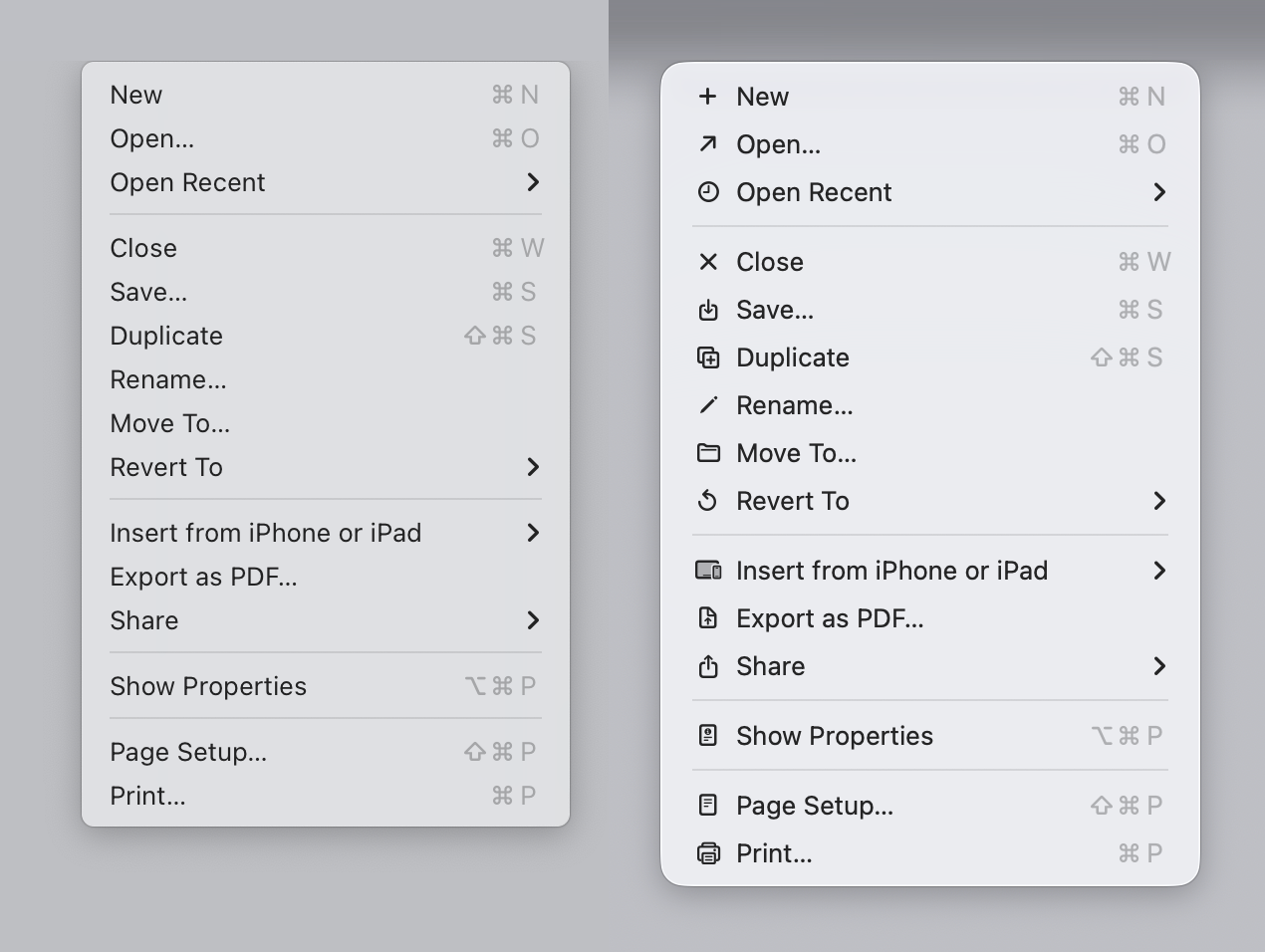
I can't see how half of the icon choices made in the article would pass internal testing, let alone actual user testing.
Maybe stakeholders were calling the shots and everyone was like, "Fine. If you want us to reuse the same icon for different purposes, you're the boss. We are done trying to explain why this is a bad idea."
65
a month ago
Yes this is always how it's been, especially if you're a front end developer. Changing designs every few months just for the hell of it is what designers do.
nine_k
a month ago
Sadly, the desktop interface was not perfect by 1995. It was visually near-perfect, but the UX, acutal ease of interaction, left much to be desired. Sadly, it's the visuals that make pretty screenshots. The actual UX of OSX is quite jarringly bad in many regards 30 years later :( But developing interactions is much harder.
staplers
a month ago
Uber, Airbnb, Robinhood all took off because they created easy to use beautiful apps (compared to their predecessors).
The anti-design bias in this forum is genuinely unhinged. I see some saying the entire destruction of the natural world stems from design lol.
avidiax
a month ago
I worked at Uber. The UX designers were pretty obsessed with the iPhone app, making sure it was pixel perfect and the little cars in the city view moved smoothly and every transition was crisp and so on. The vast majority of new users at the time were on the comparatively ugly Android app.
Things got pretty bad. More than 95% of all employees (and I'm guessing 99% of designers) were using iPhones at the time. There would be rough edges all over the Android app, but as one of our designers said "people with taste don't use Android".
Imagine knowing that most of your new users were getting a subpar experience, and that not being enough motivation to expense a flagship Android and drive it daily.
But the new users kept coming, and despite mostly being Android users, they still used the product. Turns out that legacy taxis are themselves an ugly interface, and ugliness is relative.
nozzlegear
a month ago
> The vast majority of new users at the time were on the comparatively ugly Android app.
Probably the vast majority of profitable Uber users were still on iOS, though, like most apps?
> but as one of our designers said "people with taste don't use Android".
Based lol
nish__
a month ago
> people with taste don't use Android
Probably true at the time.
stefanfisk
a month ago
I remember excitedly switching to a Nexus 5X and then going back to my old iPhone a few months later because every app felt like a bad port of the ”original” iPhone app.
shuntress
a month ago
Using the term "Legacy Taxi" to imply that a taxi you don't summon by phone is somehow out-dated is wild. I understand the reason you would use it, especially at a company like Uber, but it still seems hilariously delusional.
airstrike
a month ago
That statement is just 100% demonstrably false.
I don't think anyone seriously believes Uber, Airbnb and Robinhood won because of "beautiful apps".
0x457
a month ago
"Beautiful" maybe, not "good UX" for sure. Prior to Uber, calling a cab using the phone app was...suboptimal and easier to actually call a taxi company. They also provided much better services, which is what make them stick around.
RH made a lot of investment tool accessible to people that "I just want to buy stock of some company", I used tasty trades for a while, but their mobile app while has all functionality, but realistically you will just look to overview portfolio.
BurningFrog
a month ago
Beauty has real value, but usability is far more important.
Unfortunately, most of the SW industry isn't even aware of the difference:
For beauty you hire a graphic designer
For usability you hire a PhD in cognitive psychology
progbits
a month ago
No they took of because they used illegal practices and VC money to undercut competitors.
oompydoompy74
a month ago
I think we can pretty safely assume that every large and successful company has done horrible and illegal things to get themselves there. That being said I think design and ease of use still play a significant part in Uber’s success.
kjellsbells
a month ago
Well, I didn't have Balzac on today's HN bingo card, for sure!
"Behind every great fortune is an equally great crime."
https://www.britannica.com/biography/Honore-de-Balzac/La-Com...
ethbr1
a month ago
Bit of column A, bit of column B.
eschaton
a month ago
There’s a huge difference between anti-design bias and calling out Liquid Glass for the garbage human interface design that it is. If anything, it demonstrates a substantial *pro-design* bias because it shows that people actually care about design more than any “party line” here.
naikrovek
a month ago
design for design's sake is bad, and that's what Liquid Glass is. There was no thought behind it.
It is 2026 and UIs are still abysmally slow in many cases. How is that even remotely possible? Now, with that in mind, consider (just for a moment) why people might think that UX people don't know what they're doing.
ethbr1
a month ago
> It is 2026 and UIs are still abysmally slow in many cases. How is that even remotely possible?
Because UI/X teams were separated from engineering. (Same thing happened with modern building architecture)
It's fundamentally impossible to optimize if you're unaware of physical constraints.
We need to get rid of the "It's okay to be a UI/UX designer who doesn't code" cult. (Looking at you, Adobe and Figma...)
eszed
a month ago
> Same thing happened with modern building architecture
Yes. Yes, it has. I'm currently in the midst of a building project that's ten months behind schedule (and I do not know how many millions of dollars over budget), and I'd blame every one of the problems on that. I - the IT guy - was involved in the design stage, and now in construction (as in, actually doing physical labor on-site), and I'm the only person who straddles the divide.
It's utterly bizarre, because everyone gets things wrong - architects and engineers don't appreciate physical constraints; construction crews don't understand functional or design considerations - so the only way to get things right is for someone to understand both, but (apart from me, in my area - which is why I make sure to participate at both stages) literally no one on the project does.
Seen from a perspective of incentives I guess I can understand how we got here: the architects and engineers don't have to leave their offices, and are more "productive" in that they can work on more projects per year, and the construction crews can keep on cashing their sweet overtime checks. Holy shit, though, is it dispiriting to watch from a somewhat detached perspective.
naikrovek
a month ago
Agreed. The further you are away from how a computer works internally, the worse your product for a computer will be.
We have convinced ourselves as an industry that this is not true, but it is true.
kergonath
a month ago
> We need to get rid of the "It's okay to be a UI/UX designer who doesn't code" cult.
I don’t think designers who don’t code are really a problem. They just need to dogfood, and be lead by someone who cares (and dogfoods as well).
makapuf
a month ago
In the case of Apple, I really doubt its designers don't dogfood. Do you expect them to have Android phones and linux desktops?
kergonath
a month ago
I would think like you, but then some of their design decision are truly baffling. I like the idea of Liquid Glass, but there are thousands of rough edges that scream lack of care.
0x457
a month ago
I have a strong feeling people working and approving Liquid Glass didn't dog food it in dark mode because it just looked BAD in the first builds available.
collingreen
a month ago
I sometimes wonder if anyone in charge at Apple uses Apple devices the way I do. I expect they have one, consistently-apple, high-end setup and it probably works very well for their style. Some things are great but others are insane and it seems like that happens most when using things like non-apple monitors or not typing a certain way on the phone or if you don't drive the same car.
Switching windows between two non apple monitors after waking from sleep is wildly unpredictable and has insane ux like resizing itself after a drag.
My carplay always starts something playing on my car speakers even when I wasn't listening to anything before connecting. It's so off it's comical.
The iPhone alarm will go off like normal, loudly from the speaker, even if you're currently on the phone and have it up to your ear. This has been a problem since my very first iPhone.
There has been a bug about plugged in physical headphones being unrecognized sometimes after waking from sleep even if it worked fine when going into sleep. I checked once in probably 2014 and Apples' official response was that it literally wasn't physically possible despite all of us people experiencing it. The bug was ancient even at that time and >ten years later my m4 macbook pro STILL DOES IT.
Apple and apple fanboys seem to take the stance that these are all user error on my part (remember the "you just aren't a Mac person" era?). I bet some of these are configurable with settings deep in some menu somewhere so from a certain perspective that's right but also underscores my point about the limitations of myopic dogfooding.
As a fun aside, the ux for turning on the "Voice Over" tutorial is the worse thing I've ever experienced on an Apple device. I was laughing out loud trying to figure out how to get out of it instead of finishing the unknown remaining steps. I feel bad for folks who need that accessibility in order to be effective.
random3
a month ago
This. Every time Apple made Ui changes, I’ve seen negative reactions. People react negatively to change, not to good or bad necessarily. I’ve been using the ne UI since it was in the developer beta, and can’t really tell a practical difference.
koyote
a month ago
Uber very much falls into the category of "useful despite the awful app" for me.
It's slow, bloated, buggy and ugly. Probably one of the worst apps running on my phone.
Nextgrid
a month ago
Nowadays yes, since they need to justify the jobs of hundreds of Javascript developers.
But there was a time when their app was native and was actually quite good.
cmiles74
a month ago
It's difficult for me to believe that you might be arguing all of the icons in the drop-down menus are beautiful... I know I have found them distracting.
In my opinion, this article had very clear and direct criticisms; they were hardly "anti-design bias". The increase in visual clutter is, for sure, a net loss for MacOS Tahoe.
trinix912
a month ago
Design is not just pretty visuals but also solving problems. The design of Tahoe doesn't solve any problems the previous designs didn't but it solves many of the previous problems worse than the designs before.
dec0dedab0de
a month ago
None of those companies had predecessors.
kace91
a month ago
My main gripe with Liquid Glass is how distracting it is.
Many top bars have become a group of bubbles over the content, which we’ve been conditioned to see as floating notifications for years. Things shine and move when they don’t require attention, just because.
The end result is that my OS feels like a browser without ad blocker. As much as people hated flat design, at least it didn’t grab your attention with tacky casino tricks.
bargainbin
a month ago
My main gripe is that the visual shenanigans alone were enough of a change, why rearrange the buttons?! In the early iOS beta, the new tab button was at the top of Safari, as far away from your thumbs as it could be.
Genuinely believe Apple’s design team are rudderless or have unintentionally been forced to produce something to justify someone’s career, because this whole thing is disastrous.
wang_li
a month ago
> to produce something to justify someone’s career,
This is the curse of being a UI designer for a long lived product. Once a thing has been created and future work consists of 99% code and 1% UI, your UI designer job has evaporated. And so we see that everything changes every major release of an operating system, so the UI people can justify their pay checks.
hnlmorg
a month ago
I think you have cause and effect the wrong way around.
These changes in design are intended to appeal to our magpie brain of wanting the latest, shiniest, things.
You have to understand the vanity of consumers. If every new product looked the same then a lot of people wouldn’t both buying the latest gizmo because there’s no magpie appeal. So when the market stagnates, you need to redesign the product to convince consumers to throw away a perfectly good, working device.
And it usually works as a sales strategy too.
So designers then get told thy has to come up with something that looks newer and more futuristic than the current designs. Regardless of how much those designers might love or hate those current designs.
They come up with this shit not to justify their jobs but because they’re hired exactly to come up with this shit.
gmd63
a month ago
If it's coming down from the C suite, that just makes it worse. That's cheap marketing tricks winning priority over lasting intent. It's not just the design folks trying to justify their job at that point, it's the executives surrendering to the "stock must go up during my quarters at all costs" mentality.
hnlmorg
a month ago
Worse in some ways, but understandable an others.
If Company X didn’t reinvigorate their product line then consumers might switch to Company Ys products because they look shiny and new. Which is literally why people switched from BlackBerry et al to iPhones in the previous decade.
Consumers are fickle and want that dopamine hit when they spend money. I know this and even I find myself chasing shiny things. So there’s no way we can change that kind of consumer behaviour.
To be clear, I’m not saying it’s right that companies do this, but I do think they’d go out of business if they didn’t because consumer trends will continue like this regardless of how ethical companies tried to be.
So the problem here isnt that Apple tried to refresh its operating system look. It’s that they completely jumped the shark and created something that was too focused on aesthetics while failing in literally every other metric.
gmd63
a month ago
People switched from BlackBerry to iPhone for far more than just iPhones being "shiny and new." Visual voicemail, Safari, touchscreen, etc. The recent UI redesign effort is not remotely comparable to the investment and strategy that went into distinguishing the iPhone from the rest of the cell phone market.
We're discussing this on one of the most bare and plain sites on the popular internet. Folks who are attracted to value don't care if stuff isn't redesigned if it works well. It's a bad sign if executives at Apple feel the need to invest in cheap dopamine hacks for the sake of novelty farming.
A company that stagnates or even shrinks to a healthy size can be more valuable to society, and the stock market in the long term, than one that mutilates itself in chase of unnecessary growth.
ethbr1
a month ago
In my experience, it's usually just UX hubris and ignorance about a product's expert users.
UX folks usually have no understanding of the impact of moving a common control and/or keyboard shortcut.
hnlmorg
a month ago
You’re talking about very specific rearrangements of controls. Whereas I was talking about why these big redesign initiatives get green lit to begin with.
brantonb
a month ago
> In the early iOS beta, the new tab button was at the top of Safari, as far away from your thumbs as it could be.
It’s relatively recent in iOS history that Safari’s address bar is at the bottom. There’s a setting to move it back to the top. This specific example is probably as innocent as a default getting accidentally changed during the development process.
LoganDark
a month ago
> In the early iOS beta, the new tab button was at the top of Safari, as far away from your thumbs as it could be.
Can't you swipe past the end on the tab bar (along the bottom by default) to create a new tab?
wlesieutre
a month ago
Only when you're currently in the rightmost tab, but yes
LoganDark
a month ago
Yes, I meant past the end of all tabs
busymom0
a month ago
Every distracting visual element of liquid glass looks like a tiny Ad to me which is constantly trying to distract me from what I am doing and trying to grab my attention. Super annoying.
lossyalgo
a month ago
Someone posted these settings on HN recently and it has made working on my Mac once again usable: https://imgur.com/a/macos-accessibility-settings-simpler-ret...
mismos
a month ago
Maybe that's why disabilities are on the rise. I went through the MacOS installer yesterday, it asked 3 times if I wanted to configure any a11y options, with cognitive disability featured.
temp0826
a month ago
I'm usually in linux (dual boot on a mac) but had to boot into macOS for something. I was utterly confused when I moved my cursor to the top-left and missed clicking the apple menu
Noaidi
a month ago
Alan Dye ruined everything at Apple, no idea how he clung on for so long. You know he designed the horrible ios7 as well?
https://www.youtube.com/watch?v=YSzjcVZXolc
https://tjkelly.com/blog/ios-7-sucks/
And he also takes credit for the dynamic island. It is an assault on my senses to see everything constantly moving around on my screen.
I have been working with Macs since 1995, but this year is my first using Pixel with GrapheneOS, that is how done I am with Apple. Unfortunately I know the UI will not change for years and I just could not take it.
imbnwa
a month ago
>Alan Dye ruined everything at Apple, no idea how he clung on for so long
Cook doesn't seem to a have any taste for product design, isn't he a logistics guy?
jdougan
a month ago
Yup. He is, by all accounts, a great supply-chain guy. eg. As far as I can tell, there were no significant breaks in Apple's supplies during COVID.
But he clearly falls afoul of Steve Jobs'warning about leaders with no taste.
kridsdale1
a month ago
This is even an understatement.
It’s not a stretch to say that Tim Cook created the whole Shenzhen microelectronics industry. The thousands of specialist component vendors and large integrators that assemble products trace to his instigation with Compaq and then Apple. The iPod, Macs, iPhone, copied the Swiss Watch model of vast redundant networks of component competetors working as an ecosystem to drive down costs.
This created the skill and machinery base that made it possible for other western design companies (such as Android vendors that were not Samsung or Japanese) to make clones of the iPhone quickly and easily. (Let’s be real, every smartphone is an iPhone 1 clone)
China owes a lot to this work.
Noaidi
a month ago
Tim Cook needs to drop some acid. He has no creativity what so ever.
ethbr1
a month ago
You'd think a supply chain guy would be able to get ahold of some psychedelics too...
iainmerrick
a month ago
You know he designed the horrible ios7 as well?
I don't think that's fully accurate, unless you have a link that confirms it? That Dye designed it, I mean, not that it was horrible...
Jony Ive was the head of design at that point (both hardware and UI). Wikipedia says Dye "contributed greatly to the design language of iOS 7" but Ive would have had final say. Certainly at the time as I recall it, iOS 7 was seen as Ive's baby.
Also, I'm not defending iOS 7, but I reckon its visual design was a lot more influential than it gets credit for. Think of those ubiquitous Prime bottles, with their bright saturated color gradients; the first place I remember seeing that style was iOS 7. I bet they picked that style for Prime because kids liked it, and kids liked it because kids like iPhones.
Edit to add: "bright saturated colors" goes back a long way to Fisher Price toys and the like, of course, but it's the gradients specifically that I think iOS 7 popularized.
ndiddy
a month ago
I've heard rumors that part of why iOS 7 was so garish is because Dye's background was in product packaging so his team were doing design reviews on paper and didn't realize that the colors would look different on device due to CMYK vs RGB. Not sure if it's ever been confirmed but it would explain a lot.
kridsdale1
a month ago
I was in the room for a few design reviews for my part of iOS 7 (I was an engineer writing the new screens). Everything was done on a 90+ inch HDTV that we AirPlayed from our Macs or iPhones to for the room to view. Not printed, though the design studio walls were covered in printed explorations of variations of concepts, that is true.
Dye was the senior rep of the Design org present and commenting on all our software progress. I never once encountered Ive.
ndiddy
a month ago
Thanks for the clarification! Out of curiosity, do you have any other insight into how/why iOS 7 turned out the way it did? What was the internal attitude towards it like?
trinix912
a month ago
I find it hard to believe that Dye would be so incompetent to not even know about CMYK vs RGB. How did he even get hired by Apple?
kibwen
a month ago
Dye was a symptom, not the cause. At a widespread organizational level, Apple just does not give a shit.
chuckadams
a month ago
I will take the bottom bar of iOS7 Safari any day over the wretched mess that it is now.
lotsofpulp
a month ago
Is it just me, or does answering a Facetime call now require pressing buttons at the opposite top and bottom corners of the screen?
How does that benefit anyone?
morshu9001
a month ago
Is he the one responsible for the 2016 MBP? It took Apple like 6 years to fix everything about that
pier25
a month ago
Thank god he left for Meta
sirwhinesalot
a month ago
Really? Same guy? OUFF. What a track record...
chuckadams
a month ago
I rather like the skeuomorphism ... on the buttons anyway. The distortion effect on the glass is simply annoying, and the overall effect on an already-cramped UI like Safari on a phone is just ... ugh. There's now basically three blobs of mystery meat at the bottom of the screen. So if Liquid Glass was made for mobile first, it's an even bigger failure. It's actually more tolerable on desktop, though the double-border effect on things like the control panel stick out pretty badly.
user
a month ago
bauerd
a month ago
It’s not how you get promoted though. Plus implementing complex UIs is challenging which engineers like. The incentives are off.
eddieroger
a month ago
It's not only not how you get promoted, it's a pretty good way to get canned as well. If you don't like the work you're being asked to do, your options are pretty limited to doing it or going elsewhere. There are a million UXers and engineers who'd love to work at Apple and would be happy making whatever their boss suggests.
rdiddly
a month ago
That's how you know the "culture" and the "vision" really do have to come from the top, and how you know Steve Jobs really was providing value.
EGreg
a month ago
Seriously. People got canned for resisting the corporate overlords. That’s capitalism. Corporations run by their employees? Guilds? Cooperatives? Hah! https://www.youtube.com/watch?v=ynbgMKclWWc
Just that usually the forcefed initiatives have to do with corporate profits for shareholders, or trends like shoving AI into everything. Imagine saying no to that!
Even at the supra-corporate and supra-national level, if the organizing principle is competition, no actor not even a CEO or a corporate board or a government can afford to stop racing towards disaster. There is a simple mantra: “If we don’t achieve AGI first, China will and then they’ll dominate.”
Once in a while, the world comes together to successfully ban eg chemical weapons or CFCs, and repair the hole in the ozone layer. Cooperation and restraint takes effort.
Judging by the way we’ve drained all the aquifers, overfished the last fish, destroyed the kelp forests, cut down the rainforsts, bleached the corals, and polluted the world with plastic, I don’t think there is much hope of stopping.
Insects and pollinators are way down, and many larger species are practically extinct, 95% of the world’s animal biomass is humans and their food, and people still pretend environmental catastrophe is all about a few degrees of temperature.
PS: Yes, that escalated quickly. In the real world, it has taken only 80 years… :-/
mgfist
a month ago
I don't think corporate profits are the reason Apple has shitty UX because it's hard to argue how shitty UX correlates to higher profit, especially when it costs more to create a shitty UX than to keep the good one you already have.
I reckon it's more that some Apple VP has to justify their million dollar equity package by creating work for their org, because otherwise why should you still have a job?
groundzeros2015
a month ago
That’s not capitalism. That’s hierarchy. It didn’t start in the 20th century
EGreg
a month ago
Capitalism and competition produce the results I describe further down the comment. It escalates to planetary catastrophe
groundzeros2015
a month ago
Let’s focus on the specific claims in your comment.
> People got canned for resisting the corporate overlords. That’s capitalism
Being told to do things by your boss is a problem as old as time. Except with capitalism you can change bosses — a luxury which has not existed throughout history.
EGreg
a month ago
Okay great. Now keep going with the rest of my comment and address the rest point by point. You’ll find that it expands from that first point, and describes the consequences of capitalism and competition as an organizing principle.
hex4def6
a month ago
We are discussing UI/Icon design, not the geopolitical implications of AGI or the Holocene extinction event.
Why should someone that disagrees with you on whether capitalism is uniquely responsible for bad icon design now be forced to defend it for every sin / shortcoming ranging from the social inequity to ecological collapse?
groundzeros2015
a month ago
Sure, I guess I’m here.
Why is capitalist competition worse than any other form of competition? Wouldn’t wartime competition over land and sovereignty be far worse? Didn’t the Soviet Union have extreme forms of political competition?
bradgessler
a month ago
Yeah, software orgs ship their promotion structures.
grufkork
a month ago
Besides the visual design, I've been thinking about the tech part of it. There's so many bits shifting, morphing and having state, that it sounds antithetical to what a UI is supposed to be: a consistent and unnoticeable tool to interact with software. I do like some of the things they do to free up screen space, but having components being to programmatically complex is bound to cause issues. Besides having your presentation desync with your data, your UI now has opportunities to desync with itself...
hopelite
a month ago
It’s an extremely uncomfortable conflict and contradiction between corporate organization, finance “capitalism”, engineering, and creatives; in addition to individual vs group dynamics.
Corporate structure is driven by exploiting and using value for and by a de facto nobility (the c-suite).
Finance “capitalism” seeks to extract value, be it short or long term.
Engineers are motivated by building and creating value.
Creatives are driven by changes for changing’s sake to remain or get a seat at the table.
The uncomfortable reality is that these are inherently conflicting interests that are pulling and pushing each other, but mostly top down.
It’s essentially the “colonialist” exploitative model of existence using creators to leverage rather than extract natural resources, a system that is increasingly not suitable for the modern, technological, commoditized world. AI is a good example of that; it arguably diminishes the value to n degrees of both engineers and creatives, while also leaving the “nobility” and their neo-aristocratic corporate system out in the open exposed as revealing it not only as having no clothes on, but utterly abusive, useless, and downright evil. And no, that’s across the whole political spectrum, not just the opposite of your silly system approved political sport team.
karmakaze
a month ago
The problem with Apple's execution of Liquid Glass is that the intended audience isn't the iOS user, it's the onlooker watching the iOS user (FOMO). That was an effective strategy when iPhone popularity was growing rapidly. Now that we're in a plateau of market saturation (post-peak Apple), anything directed at the onlooker which detracts for the actual user will hurt their bottom line.
recursive
a month ago
How would this work? The only place I've ever heard of liquid glass is from iPhone users complaining about it incessantly and tutorials on how to turn it off or diminish it. What would I fear missing out on?
karmakaze
a month ago
I'm merely saying that Apple is cargo-culting their own success formula and it's failing.
reddalo
a month ago
I agree, Liquid (Gl)ass is hideous. I'll stick to macOS Sequoia for the time being.
codyb
a month ago
MacOS 26 highlights were... and this was _Apple's_ opening modal...
"Icons that look like shit!"
and
"Notification summaries that may not be correct!"
In general I feel as if Apple's software feels buggier and less solid lately across my iPhone and my computers. Won't be upgrading the personal computer for as long as possible
euroderf
a month ago
> Apple's software feels buggier and less solid lately across my iPhone and my computers.
Agreed. Rendering is very flaky. Input events are dropped.
Blinky. Laggy. Two of the Seven Dwarves of Liquid Glass.
shermantanktop
a month ago
Buggy, Flaky, Dropsy, Blinky, Laggy... that's five. How about Wobbly and Gloopy to round out the seven?
queenkjuul
a month ago
I finally talked my company into letting me swap out my MacBook pro for some little Dell. After the last year of updates, my Mac has stopped resuming from sleep reliably, everything is ugly, they took the already barely usable (imo) finder and system settings and found exciting new ways to make them worse. Sadly corporate security means os updates were not optional.
I've never really liked macOS but it feels like someone at Apple was hired just to make it even less likable for me personally lol
williamdclt
a month ago
> already barely usable (imo) finder
been using a Mac for years, and to this day I don't know how it's possible to navigate directories using Finder. It only has shortcuts for a few folders by default (photos, documents...) and doesn't have a button to navigate to the parent folder. I have literally no idea how to get to my home directory, I need to use the CLI
massysett
a month ago
> doesn't have a button to navigate to the parent folder.
Command + Up Arrow, which is also visible if you click on the "Go" menu. There is also a toolbar button that shows the entire set of enclosing directories; offhand I can't remember whether this is visible by default. There is also "View -> Show Path Bar" which shows all this information at the bottom of the window.
> I have literally no idea how to get to my home directory
Go -> Home, which shows a shortcut key for this, Command-Shift-H.
rubslopes
a month ago
I've grown increase hate towards Finder to the point that I avoid using at all costs. I've been migrating to the terminal, using fzf to find files and directories and yazi for a more graphical experience.
How can it be called FINDER, if it can't FIND things? cmd+shift+g should be a fuzzy search, but it returns nothing 80% of the time. cmd+f often can't see files that are in first level folders inside my home folder.
Meanwhile, hitting Esc+C in the terminal (via fzf) it's totally effective.
BalinKing
a month ago
Off the top of my head, I want to say you can right-click on the current folder name to see (and navigate to) all its ancestors.
ngcazz
a month ago
Correct - IIRC it's called the "proxy icon"
cmckn
a month ago
> I have literally no idea how to get to my home directory
Just add it to the sidebar. Finder > Settings > Sidebar > Locations. Or drag it into Favorites.
> doesn't have a button to navigate to the parent folder
View > Show Path Bar. You can also right click on the directory name at the top of the window and it’ll give you the same options.
hnlmorg
a month ago
I’ve said many times before that I think Finder is the worst default file manager of any popular desktop environment.
I get it’s supposed to be easy to use but so much functionality is hidden behind non-obvious shortcuts. The end result is you either need to memorise a dozen secret handshakes just to perform basic operations, or you give up and revert to 70s technology in the command line.
naikrovek
a month ago
> I’ve said many times before that I think Finder is the worst default file manager of any popular desktop environment.
[GNOME enters the chat]: "That's nothing, I'm way worse!"
josteink
a month ago
When on macOS using Finder I often wish I had something as nice and consistent and usable as Nautilus.
Finder is genuinely horrible. It’s obvious no one at Apple cares about files anymore nor anyone working with them.
We’re all supposed to consume cloud these days or so it seems.
shantara
a month ago
My go to example would be long lasting issues with SMB support in Finder. All operations are very slow, the search is almost unusably so. The operations that are instant on every non-Apple device take ages on a Mac. I first ran into these issues 7 years ago when I set up my NAS, and they present to this day. I tried all random suggestions and terminal commands, but eventually gave up on trying to make it perform as it does on Linux.
With Apple's focus on cloud services, fixing the bugs that prevent the user from working with their local network storage runs contrary to their financial incentives.
hnlmorg
a month ago
Is it actually though? It’s cool to criticise Nautilus but, at worst, it’s just equally as bad as Finder. Which shouldn’t be surprising given how much it’s styled to look like Finder.
However in my personal opinion Nautilus’s breadcrumb picker does edge it against Finder.
So I stand by my comment that Finder is the worst.
naikrovek
a month ago
Nautilus opens a new window for every folder you enter. Finder does not.
That used to be a preference, and last I used it, it was not. It is forced on because that’s how the GNOME developers thought you should use it… “Our way or the highway!” — GNOME devs.
Finder wins based on that alone. Finder wins so completely because of that one single thing that I’ll never voluntarily use GNOME again.
dsego
a month ago
You can add shortcuts to the sidebar by dragging. You can right click the folder name in the top bar to get a list of parents. You can also View > Show Path Bar and see the the full clickable bread crumbs. Not sure why this is so confusing if you bother to try.
shantara
a month ago
Even after decades of using macOS I still cannot wrap my head around the fact that Finder has no single button shortcut for opening a file - the most common operation a file manager should do. It’s Cmd+O, and it cannot be changed to anything sane like Enter key.
krackers
a month ago
You can remap it to any shortcut you want (as long as it has a modifier key in it)
shantara
a month ago
>as long as it has a modifier key in it
Why on Earth is this a requirement? When you're navigating through Finder using keyboard, it's very inconvenient to use two keypresses to perform a very basic operation. Using Enter to open a file is how every file manager on every operating system works except Finder. Why would Enter key be hardcoded to a file rename operation instead?
It is a typical Apple behaviour of doing things differently from the rest of the world just for the sake of it, even when it's detrimental to the user experience.
krackers
a month ago
>Why on Earth is this a requirement?
Actually I just checked and it's not, technically you can create key equivalents without modifiers as well [1]. For Finder this doesn't work though, because enter seems to be specifically handled before menu-level key equivalent processing. (Note that it's not guaranteed to work on other apps either, based on [2] seems key equivalents are only dispatched if modifier keys exists. But that might be out of date since it worked for the people in the SE post.)
Option+Enter is the next closest thing.
I agree that their implementation here is not good. In fact there's already a "Rename" menu item, which isn't actually wired to the enter hotkey (this is very un mac like because it means there is no easy way to discover it). The "rename" menu item is actually a fairly recent addition to mac (I think maybe 10.11) while Finder itself is ancient (it was one of the last few apps to be migrated to Cocoa and even today still has lots of legacy warts), and possibly no one bothered cleaning things up.
[1] https://apple.stackexchange.com/questions/132984/keyboard-sh...
[2] https://developer.apple.com/library/archive/documentation/Co...
dsego
a month ago
Space for preview.
abustamam
a month ago
Do you like Windows dark patterns more than Mac's shitty designs? Seems like no one wins here. I personally just refrained from upgrading to Tahoe
Edit:typo
Hamuko
a month ago
I got a new Apple Watch and just getting it set up was a pain. For some reason the passcode input would fail to register key prompts and I had to spam the buttons until something clicked. Then I gave my old Apple Watch to my mom and the setup failed like three times before we managed to get it done. Did make me wonder if anyone at Apple actually tests setting up these devices.
bix6
a month ago
Apple has been crashing with increasing frequency for me. Luckily all minor but I’m waiting for the big crapout.
Also what happened to their filters? I get daily spam from Apple email addresses now.
codyb
a month ago
What I love is how their own features don't even play well together anymore...
For instance you can "hide your e-mail" by using Apple's relay, but if you do so... your payments using Apple Pay will fail unless you fill all the information in manually because the e-mail addresses don't match
It's ridiculous how poorly tested everything is, and that combined with their newly entered foray into the world of politics has nearly destroyed three decades of steady Apple use for me. I'll be actively considering other options, not upgrading, and looking elsewhere for products in spaces they're in
plutokras
a month ago
I too have the techie urge to upgrade my software whenever I can, ut after watching the Tahoe demos, I'm staying on Sequoia indefinitely.
I would really appreciate it if the next macOS would be about stability instead of some fancy features barely anyone asked for.
pier25
a month ago
Same. Wish I could go back to Ventura or even Mojave though. There are zero new features I use. Still hate the newish Settings app.
reddalo
a month ago
Yeah, me too. The old Settings app was easy and intuitive; I hate the new one.
port11
a month ago
Same. And finally thinking that our KDE home server doesn’t look too bad, it’s almost comforting.
The major reason to stay on macOS is stability. Hopefully they stop breaking things on the Mac front.
michaelbuckbee
a month ago
The only "real" justification is that this is a long term play to figure out a UI and interaction shift that will work for general augmented reality devices (aka whatever device Apple releases five years and two iterations from now based on the Vision Pro.)
afavour
a month ago
That’s the same logic that led to the Windows 8 UI being designed tablet first because that’s “where we’re all going”. Fast forward to Windows 10 where MS had to concede that, no, turns out it isn’t where we’re all going and rolled most of it back.
ghaff
a month ago
It's somewhat understandable.
A lot of us felt at the time that surely laptops and tablets would converge. Otherwise, what a waste of hardware.
But it hasn't really happened. From a hardware perspective, things have gotten closer with the iPad's magnetic keyboard. But, I still find that the iPad as laptop replacement to be a compromise that I may tolerate for travel but don't love for a lot of laptop work.
emchammer
a month ago
Magnetic keyboard on the iPad is such a lose. Some Thai hacker got full macOS running on his iPhone over Christmas. Apple are cowards collecting dividends.
ghaff
a month ago
The magnetic keyboard lets you use the iPad without it having to be resting on a solid surface like basically every tablet/keyboard combination out there. Microsoft has tried various hybrid laptop/tablet arrangements that did both things mediocrely. I have zero interest in what someone has hacked together.
carlosjobim
a month ago
iPads are great devices for non-tech savvy people who need a computer for stuff like writing and reading documents and e-mails, planning travel and making reservations, keeping in touch with people on messaging and social media.
That's a gigantic market segment, and Apple has to be very careful to not make those devices complicated or vulnerable.
Yizahi
a month ago
As a tech support for a person with iOS gadgets, this is exactly some tasks which are way too hard on iPad. Emails getting lost because default Mail app was flaky, so I need to install Gmail app. Travel involves tickets, aka files. Now I need to help find the files in the locked down hell of a UI and figure out how to send them to a different app. Bonus points if they were archived and need unpacking. Messaging - some accounts tied to an old number, and a new number is needed to, well, make calls, and Apple generously doesn't provide dualsim option outside of China, so now I need to figure out sync between two devices with two sims, and then some messengers don't allow that while others do, and then I need to explain all that to an elderly non-IT person... In short - it's a mess, every time any task outside of doomscrolling an watching YT arises on iOS.
ghaff
a month ago
Exactly. I tend not to use my iPad that much except when traveling--partly because I have an old MacBook that lives on my dining room table. If I didn't have that I would certainly use my iPad more (and would doubtless get more comfortable using it for more purposes).
technothrasher
a month ago
I struggle to find any use case at all for my iPad. Even when traveling, I use my phone most of the time and when I want something bigger, I have the MacBook Air in my bag, which doesn't feel any more cumbersome to have with me than an iPad.
ghaff
a month ago
I won't really argue much. I can get by with just my iPhone. I think a MacBook (don't have an Air) is better for a lot of things even if the iPad is better for media on a plane. The weight difference is minimal if you count the keyboard. I don't draw so don't need an iPad for that. A Kindle weighs nothing so I can always bring that for reading.
Not sure I'll buy another iPad given my current lifestyle.
lonelyasacloud
a month ago
That will be part of it. The main driver though that they've been working on for years is trying to figure out how to add just enough desktop to UIKit to allow them to kill off AppKit as a separate thing.
sneak
a month ago
That isn’t a justification for fucking up the icons or using single retina pixels to differentiate them.
It’s just stupid people doing stupid things.
etempleton
a month ago
Without hyperbole, Liquid Glass on Mac OS is visually the worst commercial desktop UX I have ever had the displeasure of using. It is amateurish and frankly, ill advised to have even tried to unify the aesthetic across devices so universally. I think much of what is on the phone works fine. There are some pain points and some bits that are visually awkward, but generally it works and is new and fresh, but on the Mac it is as if no one really cared. And that reflects really poorly on where Apple is at, because if nothing else, Apple seemed like the company that always really cared about the user experience.
There are some things that are nice. The dock looks nice. The transparent menu bar is nice enough too and there is a toggle off switch if it doesn't work for you. Spotlight looks fine. But the rest is so bad that I just cannot fathom how someone at Apple did not stop it before release. I would be throwing a fit to stop it from being released if I was in Apple and had any sway at all. I assume the executive team was all looking at it and using it before release. So how did this happen? The new side bar and the new tool bars are abominations. I cringe every time I have to use the finder; it is just a blob of various shades of white or, if you prefer, dark mode, grey.
My hope is that if nothing else they roll back the sidebar and the tool bar changes or do a complete rethink on how they are implemented. If they rolled back the extra rounded corners I wouldn't complain either.
bargainbin
a month ago
Clearly a generation of mobile-first designers not understanding how desktops are used.
It’s dreadful, it still blows my mind that out of Windows, macOS and Linux, my Linux desktop with KDE has the most premium experience now.
sirwhinesalot
a month ago
Even on mobile it took a few iterations from when the design was first introduced for it to be usable. Not good mind you, just usable.
Even Apple's own marketing material had screenshots where text was near impossible to read, even for someone with good eyesight: grey text on top of highly transparent glass... what were they thinking!?
kace91
a month ago
>Spotlight looks fine.
Keyword “looks”. Because considering behavior, there’s tons of delay introduced and results change under your finger as you’re selecting them, causing you to get the wrong thing.
dijit
a month ago
I agree.
My first rebuttal was going to be Windows 8, but that was actually a lot better.
threetonesun
a month ago
A lot of Windows 8 I liked, but Windows perpetually suffers from needing to support older versions of Windowing systems, or some corporate usecase from the early 90s that carries too much money to ever say no to implementing.
Windows 11 is, I think, worse than MacOS these days, half for still dragging the past along with it, and half for introducing a second start menu just for ads.
etempleton
a month ago
I think Windows greatest strength is their greatest weakness, which is backwards compatibility. MacOS greatest weakness is their UX, which has slowly been going downhill for the past few years and on this release took a nose dive. It is a wild reversal from the mid 2000s when Apple's UX was so far superior to anything else that it felt revelatory to switch from Windows XP to OSX.
etempleton
a month ago
Oh geez, I forgot about Windows 8. Visually it looked nice enough, though. Once you got out of the insane touch first overlay it was fine, but I reinstalled Windows 7 so fast I never had to spend much time with it. I guess by that measure Windows 8 was worse.
cyberax
a month ago
Windows 8's alternative UI was very snappy and fluid. It was not great because it was completely disconnected from the normal UI.
theodric
a month ago
The justification is that they feel it necessary to make obvious, superficial changes in pursuit of differentiation between software versions to help keep the upgrade treadmill running.
The only UI change that I've found useful since Yosemite was Mojave's introduction of a dark mode. They made the fonts look worse on non-Retina displays, threw out the Preference pane in favor of a weird list that can only be resized vertically, added transparent everything, and banned any icon that's not in a squircle. Such UI, many differentiation, much insanely great, wow!
Anyway, I bought a ThinkPad.
smallstepforman
a month ago
Dont worry, there are thousands of aspiring artists that will gladly do it for a 6 figure salary. The person that manages your salary, they determine what you work on. Dont like the work, walk away …
brailsafe
a month ago
I'd say this is a pretty unhelpful, demanding, and borderline damaging take to spread. I've learned from experience that it's unlikely "a designer" should follow this advice or accept the archaic guilt-trip "because you make six figures" whatever that means.
If you run your own design agency, you've got your own company's reputation and yours on the line, so be as opinionated as you find necessary, but otherwise if you're just an employee without an inordinate amount of clear authority within the scope of your discipline at the large company (you know if you do or don't) then don't try and create a mutiny, it will more than likely be a childish assumption of personal risk on your part, much more so than it costs the company, much more so than anyone else needs to care, because someone on a forum told you to be passionate about round rects or small icons or whatever. If you need to tell your boss "google NN group", you probably don't have the trust or experience to be successful with such a play.
It's okay to have a personal hatred of it and do what you can to steer the work appropriately, but when you're tasked with a dumbass plan, let it be the decision-makers' dumbass plan, unless it's your decision to make. Let it be the project we tried and it didn't and couldn't have worked out, which sometimes happens, but you learn and then leave if it's pervasive and you have other options.
It would be remarkably stupid to single yourself out as the person who thinks of themselves as the reincarnation of Steve Jobs and risk your livelihood to save Apple's reputation. The unlikely upside is that you get your way and that can boost your confidence, but the downside is that you fumble your best shot at financial security for the rest of your life because you thought you'd be received well.
That's not to say you shouldn't say no to nothing, or have love for your craft, just don't pretend it's your job to, unless it is, which it's probably not. Disagree and let it be a failure if it's going to be, feel vindicated if it is, but the money is there for you if not. The people who worked on the Vision Pro aren't responsible for it being a dud product, and they can be proud of what they did design-wise and technologically despite that.
calf
a month ago
I think your take is unhelpful, demanding, and damaging to engineering ethics. If you want to live in a 90s corporate workplace hierarchy model, that's your value system. But it is untenable and harms people in the long run.
brailsafe
a month ago
Ethically speaking, the parent seemed to be demanding that some hypothetical designer put their livelihood on the line because good taste in UI design is paramount, we're not talking about building a skyscraper in a swamp out of twigs. Pat yourself on the back I guess if you want to volunteer to be a trillion dollar company's human meat shield, and relish in the virtue of being unemployed in a very bad market due to having a volatile emotional temperament, but I'd just recommend not doing that.
In the long run, no you don't want to set that much of your taste or expertise aside forever, but you shouldn't have to, it comes with all the things I said, trust & agency.
pbreit
a month ago
Tour de force article...well done! (except the snow was highly distracting)
Also absurd is that tabs and menus are not attached to their elements.
neor
a month ago
I agree, the Liquid Glass isn’t working out for Mac OS.
Few days ago I booted a very old device running High Sierra and the UI and old Dock look so clean.
That desktop was peak for me, and the age starts showing a bit in Finder, but it's still more usable than today's versions.
jonwinstanley
a month ago
Just a note on Vision Pro - as it’s been priced at $3,500 - I’m not sure I’d say it’s unsuccessful.
I bet they’ve sold approx as many as they thought they would.
This product is a placeholder for a cheaper and lighter one in the future.
herbturbo
a month ago
Nielsen Norman used to be quoted constantly during UX discussions at various places I worked. Seems like UX folks and Information Architects have slowly been replaced by a general purpose “designer”
Eric_WVGG
a month ago
There seems to be two takes on the whole liquid glass thing.
- UI/UX pros who understand this stuff: “I hate it” - everyone else: “I didn’t notice until you pointed it out”
steve1977
a month ago
I also don't really understand where the raised sidebar gets its color tint from. Wouldn't the desktop background be underneath everything else?
morshu9001
a month ago
I don't mind Liquid Glass. What annoys me is how it's seemingly someone's full-time job at Apple to periodically make me relearn how to find my photos or open Safari tabs.
Rebuff5007
a month ago
I generally don't place "conspiratorial" motivations to explain the decisions of tech companies, but I can't help but think this is a move from apple to keep their ludicrously powerful M-chips busy with mundane UI because the average user will never need to otherwise upgrade past an M1.
drewbeck
a month ago
These directions come from above the PMs, especially at a place as design-focused as Apple.
nooee
a month ago
Unpopular opinion, but I find Liquid Glass incredibly satisfying (I set it to Tinded though). The transitions are just really well done. The glass effect itself is a fun gadget, but unnecessary. I dislike how it must waste my battery. Give me the transitions of Liquid Glass with a basic frosted glass material and I would be perfectly happy, but the current state is fine too.
conductr
a month ago
> If you're a designer at a top 10 S&P 500 company making 6 figures,
... your career requires constantly chasing after what amounts to fashion trends every few years, otherwise it's a solved problem and probably does not provide much of a career
kibwen
a month ago
> If you're a designer at a top 10 S&P 500 company making 6 figures, you owe it to yourself to have some love for your craft.
I think you've unintentionally illustrated the root of the problem here.
People motivated by profit are not incentivized to produce high-quality results. Rather, people motivated by profit are only incentivized to do the least effort that they can get away with.
People motivated by pride are those who are incentivized to produce good results, because the result reflects on them personally.
Which is all to say, pride motives produce a race to the top, whereas profit motives produce a race to the bottom. It's no wonder our modern economy can only produce slop.
sam1906
a month ago
[dead]